
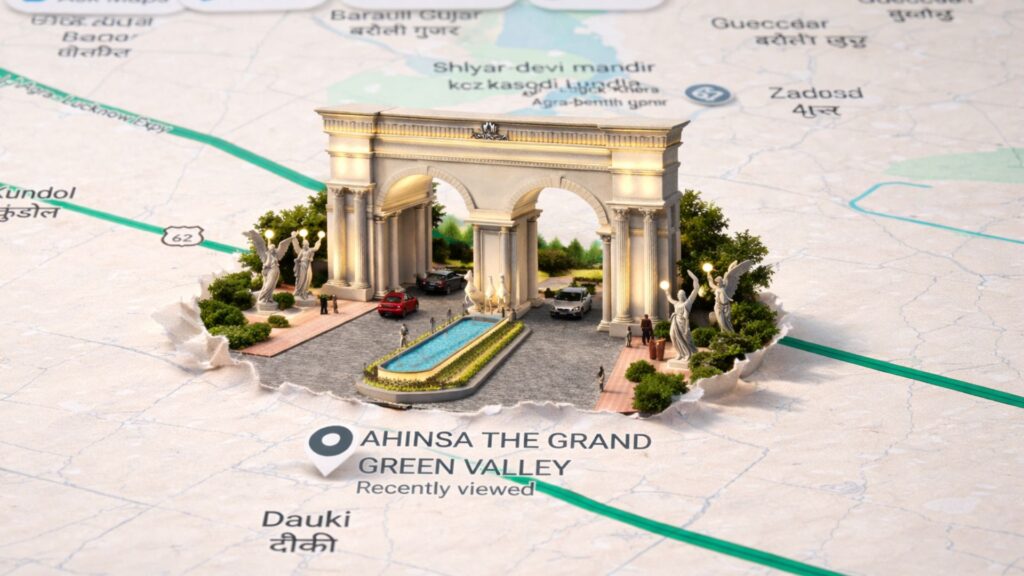
- First open Google map on your phone and search the location.
- After finding your location take a clean screenshot
- Then visit ChatGPT or Gemini Ai.
- Then upload you Google map screenshot of your location and paste this prompt given below.
Ultra-realistic close-up photograph, vertical 9:16. Use the uploaded Google Maps location screenshot as the exact base background (no redesign, no UI changes, no distortion). The selected location point must remain perfectly aligned and unchanged. A realistic Indian adult hand entering naturally from the top-right side of the frame, holding a real red push pin between thumb and index finger. The hand must have authentic Indian skin tone, natural skin texture, visible pores, subtle wrinkles, realistic nails, no beauty smoothing, no artificial look. The red push pin must look physically real with proper plastic texture, slight surface reflections, and a sharp metallic needle tip accurately piercing exactly through the selected location point on the map. Correct physical interaction: Pin needle slightly pressing into the map surface. Very subtle paper indentation. Natural soft shadow of hand and pin. Proper depth of field. Focus locked on pin tip and selected map location. Lighting must be natural indoor daylight, soft and realistic. No CGI look. No cartoon effect. No fake AI smoothing. Must look like a real macro photograph captured with DSLR camera. Extremely high detail, photorealistic, sharp focus, zero mistakes.
- After this prompt your Google map image will be ready with a pin.
- After this, take a clear front view image of your building or home
- Then again this Gemini or ChatGPT upload both images and paste this prompt given below.
Ultra-realistic macro photograph, vertical 9:16. Use the uploaded Google Maps screenshot as the exact base background. Do not redesign, blur, or alter the map UI in any way. Keep layout, labels, roads, and colors exactly unchanged. At the exact selected pinned location, seamlessly integrate the uploaded place/object reference so that it appears physically emerging from the map surface. The place/object must look fully three-dimensional, realistic scale model quality, not flat, not printed, not pasted. It should look like it is rising naturally out of the map paper. Physical realism rules: Subtle paper tearing or surface elevation where the object emerges. Natural depth and perspective matching camera angle. Accurate shadows cast onto the map. Correct lighting direction consistent with environment. Realistic textures and materials. Proper depth of field (focus on emerging object). No hand. No push pin. No CGI look. No cartoon effect. Must look like a real macro DSLR photograph of a miniature realistic environment coming out of a printed map. Extremely photorealistic, ultra-detailed, zero distortion, zero UI mistakes
- After this your final image will be ready which look like – your location pop-ups on Google map in 3D mode.
- Now it’s time to create A video.
- Open any Frame to Frame Video Generation Tool or flow Ai.
- Upload your second generated image in first frame, and upload original image.
- Now check all setting and select video ratio and paste this prompt given below.
Ultra-realistic macro cinematic video, vertical 9:16.
Start with a real Google Maps screen showing “Ahinsa The Grand Green Valley” location.
The map UI must remain completely unchanged and realistic.
Camera slowly zooms into the pinned location.
Suddenly, the map surface begins to slightly rise and crack.
From the exact pinned point, a highly detailed miniature 3D architectural gate (luxury grand entrance with pillars, statues, fountain, warm lighting) starts emerging from the map.
The structure rises smoothly as if physically coming out of paper.
Subtle paper tearing and elevation around the base.
Lighting is natural and cinematic, matching the environment.
Realistic shadows fall onto the map surface.
Camera performs a slow cinematic push-in and slight angle shift to reveal depth.
Shallow depth of field, macro lens look.
Highly photorealistic, DSLR quality.
No hand, no pin, no UI distortion, no CGI feel.
End with a clean cinematic reveal of the full structure.
- After this prompt hit enter button and wait for few minutes.
- Now your Ai Video will be ready to upload or use for content creation.